
Logitech Signature Comfort Plus Combo MK880 Review
The Logitech Signature Comfort Plus Combo MK880 is a solid kit for the mouse and keyboard


Since the keyboard is the better of the two devices for me, it’s a little disappointing that you can’t buy that one separately
I started a new day job earlier in 2026, and it’s involved sitting at a computer and using a keyboard and mouse a lot. Paired with the amount of work I do for Explosion Network, where I have a good keyboard and mouse at all times, I quickly noticed how the cheap office keyboard-and-mouse combo the new job provided made me jealous of my at-home setup. This felt like a good opportunity to explore reviewing some more generic keyboards for Explosion Network, where we’d previously mostly covered your gaming keyboards and mice.
The Logitech K880 combo comes with the keyboard and mouse, though it’s worth noting you can’t actually buy the keyboard separately from this set, just the mouse. In the box, it’s very straightforward: the two devices connect via Bluetooth and can connect up to three devices at one time for quick switching between them. You get the necessary batteries for the keyboard and mouse as well (woo), but I also discovered there’s a Business version of this package that includes the Logi Bolt USB-C receiver, which the standard version doesn’t, if you don’t want to rely on Bluetooth.
The mouse is being touted as the standout part of this combo, and probably why it’s also being sold separately, so let’s talk about that first, as it touches on something unique about it.

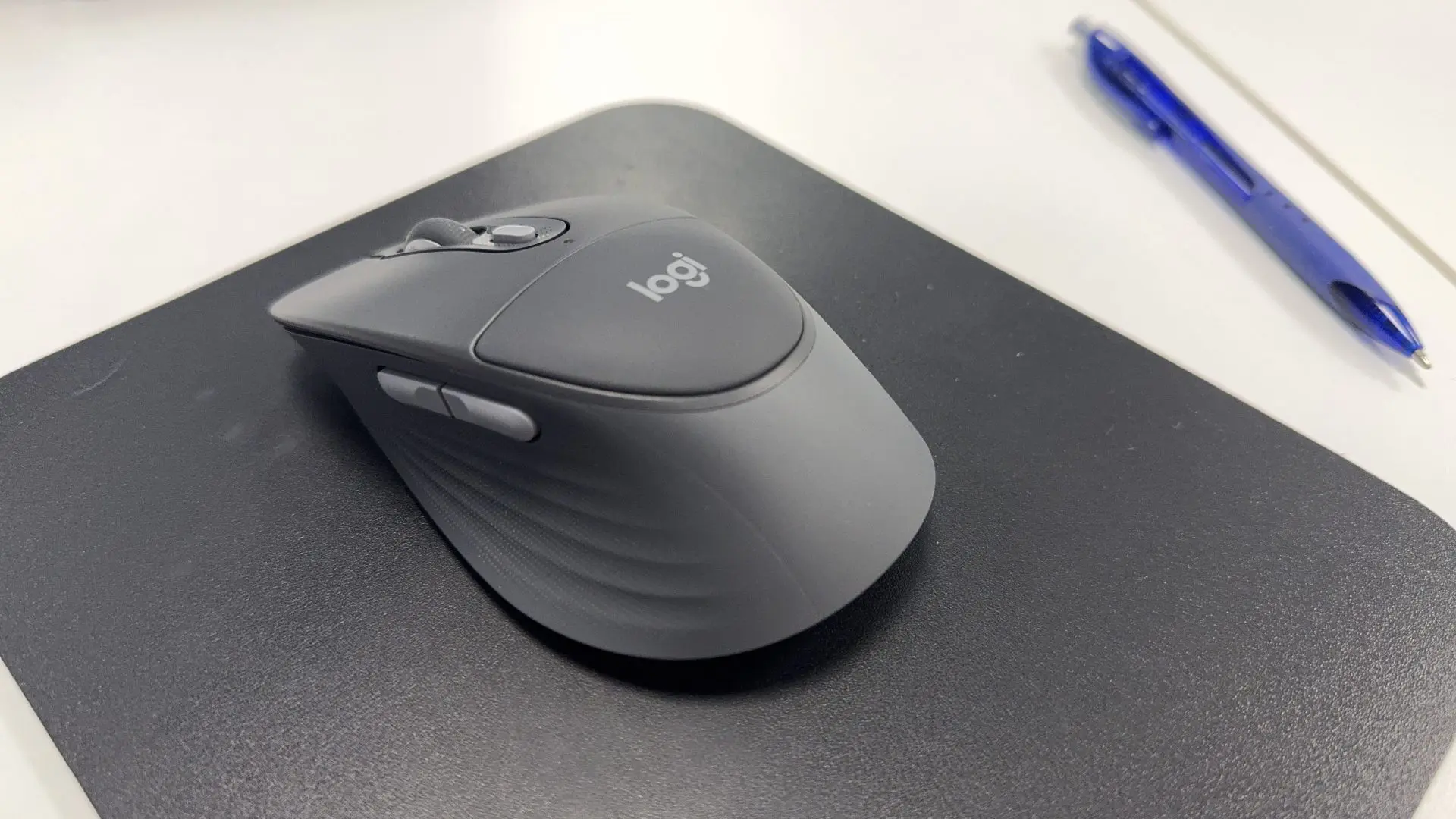
On top of the mouse is a soft cushion that feels nice when you prod it with your finger. I haven’t noticed any use or difference from having a cushion here. I don’t think I’ve ever really considered the part where my palm sits on the mouse and gets sore at any point, either. The cushion feels like a unique addition but is unnecessary and may serve only as a “first in a mouse” selling point that doesn’t add value.
The rest of the mouse is great; however, its curved shape (designed for right-hand use) is very comfortable thanks to a nice rubber texture on the underside, and I found its size to be perfect for all-day use. The scroll wheel rolls and works as expected. There are three programmable buttons, one on top below the scroll wheel, and two on the left side of the mouse next to where your thumb sits. You can sync these to do whatever you want in Logitech software, or use them as the default forward and back options when browsing the internet. Some may find it more useful to quickly open programs or access features during presentations.
Unlike the keyboard, the quick switch between the three devices the mouse can connect to is located on the bottom of the mouse, which is always a weird place to have anything.

On to the keyboard, which I found to be better of the two, though it’s not purchasable by itself if you’d like just a keyboard upgrade.
The soft rubber rest at the bottom of the keyboard is the perfect size and comfort for typing away all day and the full-sized keyboard has all the buttons and features I wanted, plus some interesting extra ones. There’s a dedicated AI button if you want to use your CoPilot all the time, but also, more handy for use, are buttons for muting your mic, and video while you’re on any call on Teams etc. There are also three buttons dedicated to switching between the three devices you could have it connected to, on top of the keyboard, not underneath it, unlike the mouse, which is handy if you’re using those features. You’ve got two options for raising the keyboard off your desk on the back of it, which should provide enough options to find the comfort level that works best for your needs.

Both devices are quiet and feature soft-button presses. The keyboard, in particular, impressed me with how quiet and soft the buttons were for an ‘office’ keyboard. And compared to the cheaper standard one that came with my desk, there’s an unmistakable difference.
When it comes to switching between three devices, it’s super fast, and the ability to connect with different OSes and devices is handy. Meaning you can pair a Windows laptop with an iPad or Mac on the side, if you’d like. You can sync to your phone so you can reply to texts with the keyboard.
I also really appreciate that both devices are made from recycled plastics, as Logitech works to ensure they have a sustainable future. They’ve listed the recycled parts as follows on their website:
Mouse plastics:
- Graphite plastics: 63% of recycled material
Keyboard plastics:
- Graphite plastics: 77% of recycled material
The Logitech Signature Comfort Plus Combo MK880 is a solid kit for the mouse and keyboard. However, the mouse feels a little gimmicky with the cushion on top, especially given that it’s a key selling point. Since the keyboard is the better of the two devices for me, it’s a little disappointing that you can’t buy that one separately. Still, if you’re after an upgrade to both the mouse and keyboard for your work desk, especially if you have multiple devices or do a lot of video calls, these will be great for those needs.
(A review unit was supplied for the purposes of this article.)
Logitech Signature Comfort Plus Combo MK880 Review
For users who spend a lot of time mixing it up between calls while working across spreadsheets and docs, this is a solid Logitech combo with a bit of gimmickry for good measure.

Dylan Blight
[He/Him] Dylan Blight is the Founder and Editor-in-Chief of Explosion Network, an independent Australian publication covering video games, film, television and pop culture. Since founding Explosion Network in 2017, Dylan has written and produced reviews, news, interviews, features and podcasts across the entertainment industry, while overseeing the publication's editorial direction and content.
MORE FROM DYLAN BLIGHT →
Comments